



Chemical Aging of the iPhone Battery
The iPhone battery naturally ages over time and gradually loses capacity. This process is called chemical aging and is not determined solely by the age of the battery. Factors such as the temperatures it has been exposed to and charging habits play a major role. As a lithium-ion battery wears out, its ability to hold energy decreases, which in turn reduces how long the device can last on a single charge.
How Optimized Battery Charging Works on iPhone
Optimized Battery Charging is a feature designed to slow down battery aging. When enabled, your iPhone learns your daily charging habits and adjusts the process accordingly. Once the battery reaches around 80%, charging pauses temporarily and resumes later, so the phone is fully charged by the time you usually unplug it. This way, the battery spends less time at maximum capacity, which helps preserve its lifespan. On the lock screen, you’ll also see an estimate of when charging will finish. If you need a full charge earlier, you can start it manually directly from the notification.
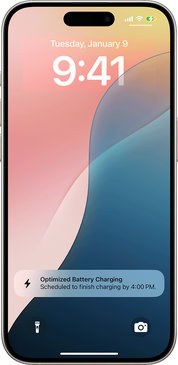
Setting the Charging Limit on iPhone 15 and Newer
On iPhone 15 and later models, you can find the options under Settings > Battery > Charging. Here, you can set the charging limit anywhere between 80% and 100%, adjustable in 5% increments. If you choose 100%, Optimized Battery Charging will also be activated.
Setting Up Optimized Charging on iPhone 14 and Earlier
On older models, this feature can be found under Settings > Battery > Battery Health & Charging. Here, it can be easily turned on or off. If you turn it off, the battery may wear out faster and its overall lifespan could be shortened.
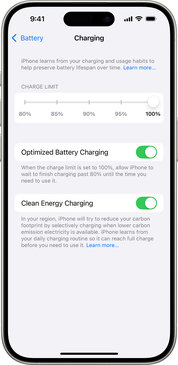
How the iPhone Charging Limit Works
The charging limit ensures that your iPhone charges only up to the threshold you set, after which the process stops. If the battery level drops by more than five percent while still connected, charging automatically resumes until it reaches the set limit again. iOS can even recommend an optimal value based on your usage, such as 95%. If you set the limit below 100%, the iPhone will occasionally charge to full capacity to maintain the accuracy of its battery health estimates.
When Optimized Charging Activates
Optimized Battery Charging doesn’t turn on immediately. The iPhone needs about 14 days to learn your habits. It also requires at least nine charging sessions lasting five hours or more in the same location.
Summary
If you’re using an iPhone 15 or newer and have the charging limit set to 100%, you can also take advantage of Optimized Battery Charging. These features are enabled by default and work together to ensure the battery doesn’t stay at maximum capacity longer than necessary. If the charge level drops by more than five percent while plugged in, charging will automatically resume until it reaches the set limit.
iOS may notify you if it detects that a lower limit would be better for your battery. In such cases, it might recommend, for example, 95%. With these settings, the battery wears out more slowly, lasts longer, and your iPhone maintains solid performance even with everyday use.

