



This notification appears on iPhone X through the latest iPhone 14 models. Apple aims to encourage users to have their devices repaired at authorized service centers or by certified technicians using genuine Apple accessories.
Where and how does the notification appear?
Notifications are displayed on the lock screen and in settings. After a part of the iPhone has been replaced. If the part has been serviced multiple times, only information about its latest service will be displayed.
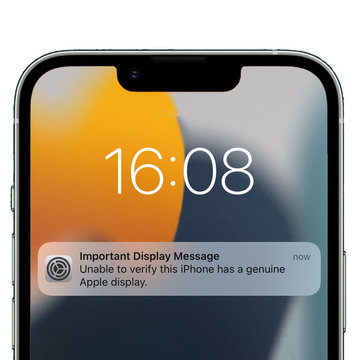
In iOS 15.2 and newer, you can check the parts and service history of your iPhone on the Settings screen > General > About.
- On iPhone XR, XS, XS Max, and newer models including iPhone SE (2nd generation), you can verify if the battery has been replaced.
- On iPhone 11 models, you can verify if the battery or display has been replaced.
- On iPhone 12, iPhone 13, and iPhone 14 models, you can verify if the back cover, TrueDepth camera, battery, display, or rear camera have been replaced.
In iOS versions older than iOS 15.2, you can only verify if the replaced part is recognized as unknown.
If original Apple parts and procedures were used during the service, the text "Genuine Apple Part" is displayed.
"Unknown Part" is shown if the part installation was incomplete or if:
- The original part was replaced with a non-genuine part
- The part has been used or installed in another iPhone
- The battery is not functioning properly
These messages do not affect the device's performance in any way and will disappear from the lock screen after 4 days, thereafter only visible in Settings. To allow Apple employees to verify this information, it will also be added to the "device information."
For smartphone repairs, our practical guides can assist you, providing clear instructions and details to ensure nothing is overlooked.

