



Where can I find the model number of my AirPods?
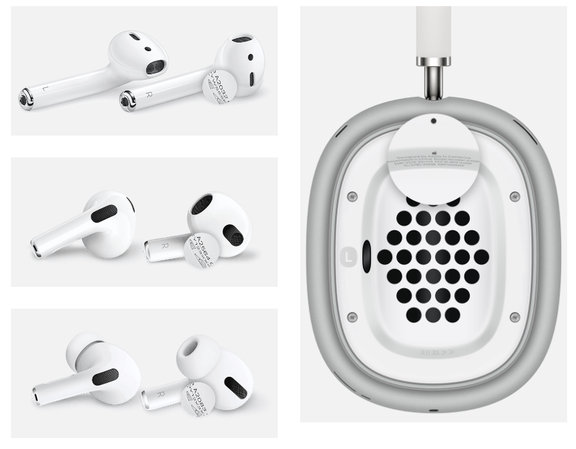
You can find the model number by looking at the bottom of each AirPod. It is printed on the first line of the text. For AirPods Max, the model number is located under the left ear cushion.
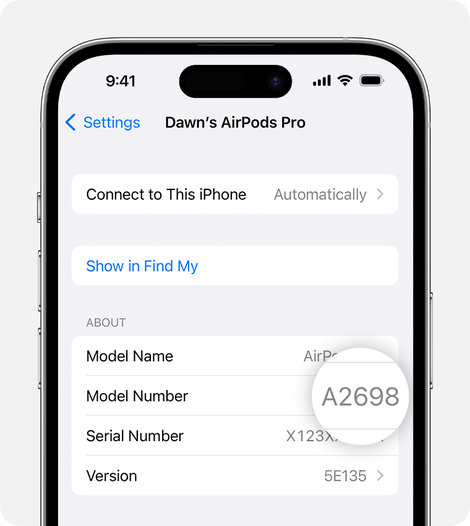
On your iPhone, you can open the Settings app, go to Bluetooth, click on the “i” next to your AirPods, and find the model number there.
If you already know the model number, you can use it to identify which AirPods you have and when they were released.
AirPods 1st Generation
Model number: A1523, A1722
Year introduced: 2016
AirPods 2nd Generation
Model number: A2032, A2031
Year introduced: 2019
AirPods 3rd Generation
Model number: A2565, A2564
Year introduced: 2021
AirPods Pro
Model number: A2084, A2083
Year introduced: 2019
AirPods Pro 2nd Generation
Model number: A2931, A2932, A2933, A2934
Year introduced: 2022
AirPods Pro (2nd Generation) with MagSafe Charging Case (Lightning)
Model number: A2931, A2699, A2698
Year introduced: 2022
AirPods Pro (2nd Generation) with MagSafe Charging Case (USB-C)
Model number: A3047, A3048, A3049
Year introduced: 2023
AirPods Max
Model number: A2096
Year introduced: 2020
Knowing the model number of your AirPods is crucial for various situations, whether it’s verifying your warranty, troubleshooting technical issues, or ensuring compatibility with replacement parts. By following the simple steps outlined in this article, you can quickly and easily identify which AirPods model you own.
Do you have a non-functional earbud or have you lost one? Choose a single replacement earbud or a complete set of earbuds from our online store. Need a case or other accessories? Browse our selection. Want to repair your AirPods? Check out our range of replacement parts for AirPods.
Need assistance? Don't hesitate to contact us.
© Images: Apple, Unsplash

